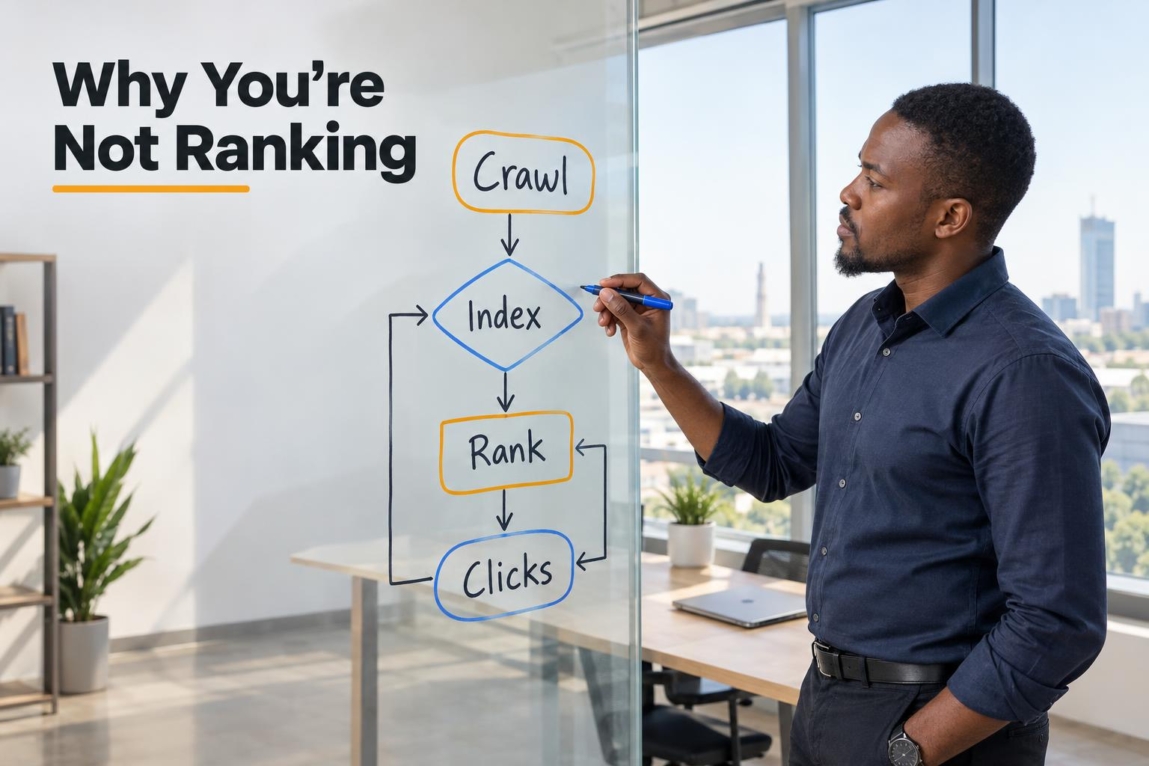

If you are asking why is my website not ranking on Google, start by finding the stage where visibility breaks down. A page may be blocked from crawling, excluded from Google’s index, indexed but less useful than competing pages, or visible in results but ignored because its title and snippet do not earn clicks.
The fix depends on the diagnosis. Adding more keywords will not solve an accidental noindex tag, and submitting a sitemap will not make a thin service page outrank a stronger competitor. Use the decision tree below before changing anything.
The Ranking Decision Tree: Crawled, Indexed, Ranked, or Clicked?

Check the exact affected URL first, not just your home page. The Google Search Console URL Inspection tool shows whether Google knows about the URL, whether it is indexed, and key reasons it may be excluded. You can request indexing after a meaningful fix, but a request is not a guarantee of inclusion or rankings.
For a page to be eligible to appear, it needs to meet Google’s technical requirements for appearing in Search, including being accessible to Google and serving indexable content. Meeting those conditions is only the starting point; it does not make a page competitive for a query.
| Stage | What you may see | Likely issue | First action |
|---|---|---|---|
| Not crawled | Google has not discovered the URL, or cannot fetch it | Robots rules, server errors, weak internal links, or a new page | Check accessibility, robots.txt, sitemap, and internal links |
| Crawled but not indexed | “Crawled – currently not indexed” or “Discovered – currently not indexed” | Google has deferred or declined indexing; value, duplication, demand, and crawl priorities can all contribute | Inspect the URL, improve uniqueness and usefulness, then review site signals |
| Indexed but not ranking | The URL is on Google but does not appear for your target search | Intent mismatch, weak relevance, low authority, or stronger competitors | Compare the page with the current first-page results |
| Ranking but not clicked | Impressions in Search Console but few clicks | Poor title, unclear benefit, wrong query match, or an unappealing snippet | Review the query, title tag, meta description, and page promise |
This distinction matters for Botswana businesses. A Gaborone service provider may assume local competition is the problem when the real issue is a page that Google has never indexed. Another business may be indexed, but its generic one-page site gives Google little reason to show it above a focused local competitor.
12 Diagnostic Checks: Why Your Website Is Invisible on Google
1. Your Website or Domain Is Brand New
A new domain has no established crawl history, content footprint, or external references. Google still needs to discover the pages, crawl them, and decide whether they belong in its index. Avoid relying on a fixed timeline: indexing requests can take up to one or two weeks and are not guaranteed, while discovery and evaluation vary by site and URL.
Make discovery easy: verify Search Console, submit a clean sitemap, link important pages from your navigation, and publish complete pages rather than placeholder copy. Do not repeatedly submit the same unchanged URL.
2. Googlebot Is Blocked in Your Robots.txt File
How Google interprets robots.txt rules explains that this file controls crawler access. Visit yourdomain.co.bw/robots.txt or yourdomain.com/robots.txt and look carefully for a sitewide rule such as Disallow: /. This can be left behind after a development or staging launch.
Robots.txt is a crawl-control tool, not a reliable way to remove a page from Google’s index. A blocked URL can still sometimes appear as a bare result. Remove unintended crawl blocks, then confirm in URL Inspection that Google can fetch the page.
3. Pages Contain Accidental Noindex Meta Tags
A noindex directive tells Google not to include a page in search results. It is often carried over from a staging site, added by a CMS setting, or left on after a redesign. In WordPress, also check whether the site’s “Discourage search engines from indexing this site” setting was enabled during development.
View the page source and search for noindex, then check server headers if necessary. Follow Google’s noindex guidance: Google must be able to crawl a page to see its noindex directive. Remove an accidental directive, ensure the page is crawlable, and request indexing only after verifying the correction.
4. Google Has Not Found Your XML Sitemap
An XML sitemap helps Google discover the URLs you consider important. It does not guarantee indexing, but it is valuable for a new site, a large site, or pages with few links. Submit the sitemap in Search Console and make sure it contains the preferred, live versions of your pages rather than redirects, error pages, or URLs blocked from indexing.
A sitemap cannot rescue an orphan page indefinitely. If a service page is not linked from navigation, a related service page, a blog post, or another crawlable page, Google and visitors may struggle to find it.
5. Search Intent Mismatch
An indexed page can still fail because it answers the wrong need. If people search “how to choose an accountant,” Google may favour guides and comparison pages; a short “Hire us now” service page may not match that informational intent. For a search such as “web design Botswana,” results may lean toward service providers, portfolios, or commercial pages.
Search your target phrase and study the first page: page type, headings, depth, local focus, and the questions answered. Then create the page that best serves the same need without copying competitors. Google’s overview of Search ranking systems confirms that Search uses multiple systems and signals to identify relevant, useful results; there is no single ranking switch to flip.
6. Thin or Incomplete Service Content
A service page with one vague paragraph, a stock image, and a contact form gives customers and search engines little detail to assess. This is especially limiting for local SMEs with a generic single-page website and no separate pages explaining services, locations served, process, deliverables, or trust information.
Expand important pages with useful specifics: who the service is for, the problem it addresses, what is included, practical next steps, relevant FAQs, contact options, and clear Botswana location context where it is genuinely relevant. Thin or duplicative content can be one reason a crawled page is not selected for indexing, but that Search Console status does not point to one single cause.
7. Weak On-Page Optimisation and Keyword Relevance
Google needs clear page-level signals about the topic. Give each important page one primary purpose and use a natural, descriptive title tag, H1, opening explanation, and supporting headings. A plumbing page should not rely on a vague title such as “Our Services”; it should say what service is offered and, where appropriate, the area served.
Also check keyword cannibalisation. If three pages all target the same commercial phrase, Google may alternate between them or show none of them prominently. Consolidate overlapping pages or differentiate their purpose, such as one broad service page and one focused location or use-case page.
8. Broken Internal Linking and Orphaned Architecture

Internal links help people and crawlers understand which pages matter and how topics connect. An important page should be reachable through logical navigation and contextual links from related pages. Broken links, deep click paths, and isolated URLs reduce both usability and crawl clarity.
Build a simple hierarchy: homepage to main service category, category to individual service, and relevant blog content back to the appropriate service page. Use descriptive anchor text rather than repeatedly linking every page with “read more.”
9. Insufficient Authority and Backlinks
Links from other relevant, trustworthy websites can help Google understand that a site is a useful reference, but they are only one part of the picture. A few low-quality directory listings or purchased links are not a substitute for relevant content and a technically accessible website.
For a Botswana business, useful signals may come from legitimate local citations, industry associations, suppliers, partners, media mentions, or resources that genuinely choose to reference the business. Prioritise accurate business details and real relationships over link schemes. Google ranking SEO works best when relevance, usefulness, and credibility support one another.
10. Direct Competition from Dominant Authorities
Some queries are dominated by established directories, national brands, publishers, or long-standing specialist sites. Before rewriting your page again, assess the search results: what types of sites rank, how comprehensive their content is, whether local results appear, and which narrower questions they fail to answer.
This is where competitor SEO analysis becomes practical. Instead of chasing a broad term immediately, build visibility around specific services, customer problems, locations, or commercial questions that match your actual offer. A focused page for a defined audience can be a more realistic route to improve search engine rankings than a generic page targeting every buyer.
11. Slow Page Speed and Poor Mobile Experience

A slow, unstable mobile page creates friction before a visitor can call, WhatsApp, complete a form, or read your offer. Oversized images, heavy scripts, intrusive pop-ups, and shifting layouts are frequent causes. Test key pages on a phone as well as desktop, especially the home page, service pages, and contact journey.
Google’s page experience guidance includes considerations such as Core Web Vitals, secure delivery, and mobile display. Good scores do not guarantee top rankings, but poor experience can weaken an otherwise useful site. If the diagnosis points to unclear navigation, unresponsive layouts, or launch-stage structural shortcomings, review the need for SEO-ready website foundations rather than assuming a content edit alone will solve the problem.
12. Unresolved Technical Errors or Algorithmic Shifts
A sudden drop deserves a before-and-after review. Check Search Console for indexing changes, manual actions, security issues, mobile problems, server errors, and pages returning 404 errors. Review recent redirects, CMS updates, template changes, domain changes, and redesign migrations. A single canonical error can cause Google to select an unintended version of a page.
For duplicate URLs, redirects, sitemap choices, and canonical tags should tell a consistent story. Google’s canonicalization guidance explains that canonical signals help Google consolidate duplicates, but Google ultimately makes the canonical selection. Ranking changes can also follow Google system updates or competitor improvements, so compare the affected queries and pages before assuming one cause.
The Website Owner’s Self-Audit Checklist
Work through this sequence for one priority page at a time. Record what you find, the change made, and the date, so you do not turn SEO site ranking work into guesswork.
- Confirm the page exists in Google. Search for
site:yourdomain.com/page-urland inspect the URL in Search Console. - Check the index status. Note whether it is indexed, excluded, discovered but not indexed, or crawled but not indexed.
- Test crawl access. Confirm the page loads for visitors, returns a successful status, and is not unintentionally blocked by robots.txt.
- Check index directives. Look for meta robots or X-Robots-Tag
noindexinstructions. - Review the canonical URL. Make sure the page self-canonicalises appropriately or points to the intended preferred version.
- Review sitemap and internal links. Include the preferred URL in the sitemap and link to it from relevant, crawlable pages.
- Compare search intent. Search the target phrase and identify what the leading results actually help users do.
- Improve the page itself. Add specific, original information that helps a prospective customer make a decision or solve a problem.
- Check mobile usability and speed. Test the page on a real phone and address obvious image, layout, and interaction issues.
- Review impressions and clicks. If the page receives impressions but little traffic, refine the title and opening promise to match the query.
Location-dependent businesses should assess organic visibility alongside Google Business Profile, citations, reviews, and local competitors. Use this local SEO audit checklist for Botswana businesses to review those local factors separately but as part of the same customer discovery journey.
When Does a Professional SEO Audit Make Sense?
A DIY fix is often enough when you find one clear issue, such as an accidental noindex tag or a missing internal link. A professional review becomes more useful when problems overlap, when a site remains unindexed after reasonable corrections, or when you cannot tell whether the issue is technical, content-related, or competitive.
Consider an audit after a redesign or migration, a sharp traffic decline, persistent crawl or canonical errors, several pages competing for the same search, or when stronger local competitors consistently outrank well-built pages. The goal is not a generic list of ranking tips; it is a prioritised diagnosis of crawlability, indexing, intent, content, internal linking, and competitor gaps. If you need that ordered view, Lephutshi Developers can provide an SEO audit and recommendation focused on the issues that matter first.
What to Do Next
Website visibility improves when you identify the correct failure point: fix access problems first, resolve index exclusion next, then strengthen relevance, page quality, site structure, and competitive credibility. If a page already ranks but attracts few clicks, improve its search result presentation instead of rebuilding the whole site.
If you need help diagnosing why your website is not ranking on Google, Lephutshi Developers can help you turn the evidence into a practical, prioritised SEO audit and recommendation.
FAQ
- How do I get my website to rank on Google?
First make sure Google can crawl and index the important pages. Then publish pages that match the searcher’s intent, make their topic clear through useful on-page content and internal links, improve mobile experience, and build credible references over time. No single action guarantees a ranking. - Why has my website suddenly dropped in rankings?
A sudden drop can follow a technical change, migration error, accidental noindex directive, server problem, lost or changed pages, canonical conflict, Google system update, or stronger competitor results. Compare the affected dates, URLs, queries, and Search Console reports before deciding on a fix. - How can I force Google to index my website?
You cannot force Google to index a URL. You can improve its chances by making it crawlable and useful, linking to it internally, including the preferred URL in an XML sitemap, and requesting indexing through Search Console after corrections. - What factors affect Google ranking the most?
Google uses multiple systems and signals. In practice, focus on technical accessibility, useful content that matches search intent, clear page relevance, logical site structure, credible external references, and a good mobile user experience rather than looking for one decisive factor. - Why is my site indexed but still not ranking?
Indexing only means Google can include the page in its database. A page may still rank poorly when it does not match the query as closely as competing pages, offers limited detail, lacks internal or external support, or targets a search result dominated by stronger authorities.