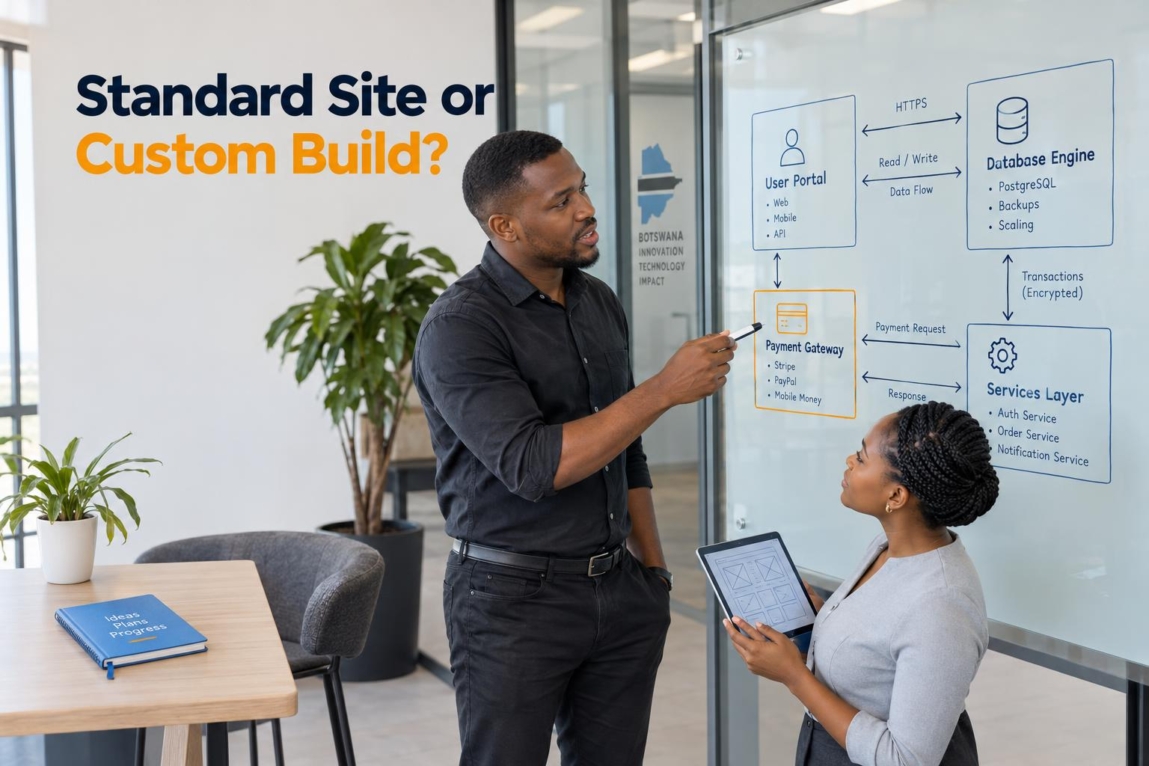

A business needs custom web development when its essential workflow, data relationships, user permissions, integrations or transaction rules cannot be handled reliably by standard pages and well-supported software. If your website mainly explains your services, displays products and collects enquiries, a standard website is usually the wiser investment. If people must log in to do work, see different private information, trigger approvals or exchange data with other systems, you may need custom functionality.
The key is not to buy custom code because it sounds advanced. It is to identify the point where forcing your operation into a template, plugin or spreadsheet creates more cost, delay and customer frustration than building the right system.
What Is Custom Web Development (Beyond the Jargon)?
Custom web development is the engineering of a website or web application around a business’s specific requirements. It can include backend logic, database design, role-based access, API integrations, bespoke workflows and tailored interfaces.
This is different from visual customisation. Changing colours, fonts, page layouts and branding can produce a custom-looking website, but it does not necessarily change how the system works. Functional custom development changes what users can do, what data is stored, how records relate to each other and what happens after an action is taken.
For example, a Botswana consultancy may need a polished services site and WhatsApp enquiry button. That is primarily a web design project. A training provider that needs learners, instructors, courses, assessments, certificates, payments and private progress records is dealing with a system-design question.
Standard Website vs Customised CMS vs Web Application

Most projects sit in one of three practical tiers. The right tier depends on the work the website must perform, not on how large the business is.
| Tier | Target business need | Data and interaction | Development focus | Best use case |
|---|---|---|---|---|
| 1. Standard website | Build trust, explain offers and generate enquiries | Pages, articles, galleries, basic forms and contact details | Theme, content structure, responsive design and conversion paths | Professional services, small organisations, campaign sites and simple lead generation |
| 2. Customised CMS | Manage structured content with tailored presentation | Repeatable records, filters, editorial workflows and selected dynamic features | Custom content types, templates, taxonomies and carefully chosen extensions | Property listings, service directories, events, resource libraries and content-led sites |
| 3. Custom web application | Run an operational process online | Private accounts, related records, changing user states, calculations and automation | Application logic, database architecture, permissions, integrations, testing and support | Portals, booking systems, marketplaces, internal tools and workflow platforms |
Tier 2 is often the overlooked middle ground. WordPress can store and manage structured content through WordPress custom post types, which can suit manageable entities such as listings, courses, team members or events. That capability does not automatically make WordPress a full application platform: complex permissions, relationships, reporting and high-change workflows still need deliberate technical design.
A useful rule: choose a customised CMS when the main challenge is publishing and finding structured content. Consider a web application when the main challenge is people completing a business process.
5 Clear Signs Your Business Actually Needs Custom Development

One sign alone does not always justify a bespoke build. Several signs together usually mean you should scope the requirements before committing to a theme or stack of plugins.
Sign 1: Your Core Workflows Cannot Be Handled by Standard Pages or Plugins
Custom development becomes reasonable when staff repeatedly work around the website rather than with it. Examples include a quoting tool with business-specific calculations, an approval path that moves between departments, or a booking model with rules that ordinary calendars do not support.
Before commissioning a build, write the workflow from trigger to outcome: who starts it, what information is needed, who approves it, what exceptions occur and what the customer receives. If a plugin handles the normal path but fails on the steps that make your operation distinctive, that gap is worth investigating.
Sign 2: Different Users Require Fundamentally Different Experiences

A public website can show the same information to everyone. A portal cannot. Customers may need their own documents and orders; staff may need queues and reports; instructors may need course tools; vendors may need listings and payouts. These are different views of different records, not merely different menu items.
Login screens alone are not enough. The system must check, on the server, whether a person is allowed to view or change a particular record or action. OWASP authorization guidance explains why access decisions should be made for the requested function or object, rather than assuming that an authenticated user may access everything. Role-based access control can help, although relationship-based rules may be needed in more complex portals.
Sign 3: You Must Integrate Proprietary or Fragmented Systems
Integration is needed when the website must exchange useful data with a CRM, accounting package, ERP, SMS provider, internal database or payment service. The work is not just connecting two logos. It includes deciding which system owns each record, mapping fields, handling authentication, logging failures and preventing duplicate updates.
WordPress can support application-style integrations through custom REST API routes and endpoints. However, the external system’s rules, security requirements and error handling still need to be scoped. This matters where local payment options, SMS notifications or existing business records must fit the workflow rather than sit beside it.
Sign 4: Dynamic Dashboards and Data Processing Replace Static Content
If users visit mainly to read information, you have a website problem. If they visit to update progress, review private status, process tasks, generate documents or analyse live records, you are moving towards web application development.
Dashboards also change performance and hosting decisions. Pages with personal, changing data cannot be treated like ordinary cached brochure pages. Queries, permissions, data updates and reporting should be designed and tested around actual user actions.
Sign 5: You Need Unusual Transactions or Custom Automation
A normal online shop can often use established ecommerce software. Custom engineering becomes more relevant when a transaction has non-standard rules: conditional payment release, multiple parties, special invoice logic, tiered subscriptions, verification steps or automated actions after a payment event.
It is possible to assemble parts of a workflow with multiple plugins. The risk is not that plugins are inherently wrong; it is that each dependency can introduce compatibility, update, security or performance considerations. Assess the whole workflow, including failed payments, refunds, notifications and manual exceptions, before relying on a layered solution.
Real-World Architecture: When Standard Platforms End and Custom Engineering Begins
The boundary is usually visible in the data model. A simple site stores content for publication. A more advanced system must understand relationships: which learner belongs to which course, which instructor manages which material, which payment relates to which transaction, or which listing matches several location and category filters.
Educational portal pattern: separate learning journeys
An eLearning platform can require distinct learner and instructor journeys, course administration, quizzes, certificates, payments, earnings information and bilingual content. These requirements do not prove that every LMS needs a fully bespoke build; established LMS and ecommerce tools can cover many needs. They do show why the project should begin with roles, records and workflow states rather than a homepage mock-up.
The Dithutong eLearning and LMS platform case study is a practical example of a WordPress, LearnPress and WooCommerce implementation with instructor dashboards, payments, quizzes, certificates and learning workflows. Its lesson is to test the required learner and instructor experience against the platform capabilities before deciding where custom functionality is necessary.
Structured directory pattern: searchable relationships, not blog categories
Consider a directory that lets people find providers by category, service attributes and location. At a small scale, custom content types and taxonomies may be enough. As records, filters and administrative rules become more intricate, the architecture must account for query patterns, indexing, data quality and how listings are updated.
For a directory, the question is not simply “Can we add categories?” It is “Can a visitor find the right record quickly, can staff manage changes safely, and can the system keep related location and service data consistent?” This is an architectural pattern, not a claim about a specific public project.
WordPress can use post meta where it is practical, and plugins can also create separate tables for certain growing application data. The official WordPress guidance on plugin database tables makes clear that this is a data-model decision, not a badge of sophistication. Separate tables are not automatically faster or necessary; the right choice depends on the records, relationships and queries your system needs.
When Custom Web Development Is Completely Unnecessary (And a Waste of Money)
Custom code is a poor first choice when a well-supported platform already fits the job. A brochure website, a straightforward catalogue, a simple lead-generation site, a standard single-store ecommerce operation or an early MVP validating demand can often start with WordPress, Shopify or another suitable platform.
It is also unwise to automate a process that has not been defined. If your team is still deciding how bookings are approved, who owns customer follow-up or what information a client must submit, clarify the process first. A simple form, shared inbox or standard tool can expose the real requirements at far lower risk.
Custom systems need planned maintenance, secure hosting, testing and someone responsible for future changes. In return, they may reduce dependence on an awkward combination of tools. Neither approach is maintenance-free; the sensible choice is the smallest reliable solution that supports the next stage of your business.
Key Cost Factors in Custom Development: What Drives the Investment?
Custom website development costs vary because scope varies. A useful quote should describe the outcomes and assumptions, not only the number of pages.
- Data model: the entities to store, their relationships, search needs and historical records.
- User roles and security: private data, permissions, approval actions and audit requirements.
- Integrations: each CRM, payment, accounting, SMS or internal-system connection adds discovery, mapping, testing and failure handling.
- Workflow complexity: rules, exceptions, notifications, calculations, documents and automation.
- UI and UX: custom interfaces for public visitors, staff and logged-in users.
- Quality assurance: testing across devices, edge cases, permissions and transaction states.
- Ongoing operations: hosting architecture, monitoring, backups, updates and future improvements.
Published packages can help you understand the difference between a standard site, advanced functionality and a custom platform, but they cannot replace requirements discovery for a system build. Review Lephutshi Developers’ current website and custom-platform starting points as planning context, not as a fixed quote for every application.
Making the Decision: A Practical 4-Step Checklist for Decision-Makers
- Map the operational bottleneck. Name the task causing delays, rework, lost enquiries or spreadsheet confusion. Draw the current steps, people involved and information passed between them.
- Test off-the-shelf feasibility. Try to meet the requirements with a standard platform and a small number of reputable extensions. Record what works, what needs manual workarounds and which critical functions depend on separate plugins.
- Calculate the cost of compromise. Consider staff time, errors, delayed payments, poor customer experience and missed follow-up—not only development spend. A workaround may be inexpensive now but costly when volume grows.
- Check the three-year runway. Ask what happens when you add more users, locations, services, transactions or reporting needs. Also identify what must be maintainable by your team after launch.
If this exercise points to professional scoping, it helps to understand what to expect from a web development engagement, including discovery, planning, testing and handover.
Custom web development is justified when it protects a genuinely important workflow, connects systems that must work together or gives different users secure tools they cannot get from a standard site. If your needs are simpler, choose the simpler platform and invest your budget in clear content, lead handling and marketing.
If you have identified complex workflows, integrations, private user data or non-standard transaction rules, Lephutshi Developers can help you turn those requirements into a sensible scope. You can request a technical scoping consultation and bring your workflow, users, integrations and main operational bottleneck to the discussion.
Recommended Reading
- eLearning & LMS Platform Development in Botswana – Dithutong Case Study
- Web Development Agency Botswana: What to Expect When Hiring
- Web Design & Digital Marketing Pricing in Botswana
FAQ
- What is the difference between custom web design and custom web development?
Custom web design concerns the visual experience: branding, layouts, user interface and user experience. Custom web development concerns the functional system behind it, including code, database structure, backend logic, integrations and workflows. - Can WordPress be used for custom web development?
Yes. WordPress can support custom post types, tailored templates, custom database solutions and REST API functionality while keeping content administration accessible. Its suitability depends on the required data relationships, permissions, integrations and workflow complexity. - How do I know if my business needs a web application instead of a website?
You likely need a website if visitors mainly read information, view services and submit basic enquiries. You may need a web application if users log in to complete work, update dynamic records, perform calculations, access private dashboards or interact with role-specific workflows. - How much does it cost to have a custom website built?
The cost depends on the scope of the data model, user roles, integrations, transaction rules, interface design, testing and ongoing maintenance. A requirements assessment is needed because published starting prices cannot define the cost of every custom system. - Is custom web development harder to maintain than an off-the-shelf website?
It can require more deliberate technical stewardship because custom code, hosting, security and future changes need planned maintenance. It may also reduce reliance on a large collection of unrelated plugins, but neither approach removes the need for updates, backups and testing.